Desk · Home: your broker account, priced live
The first screen in the sidebar and the only one that needs a broker. It is your account as the broker reports it, priced live, on the desk of its own market. Under it sit the US panels, which every reader gets whatever the home market is.
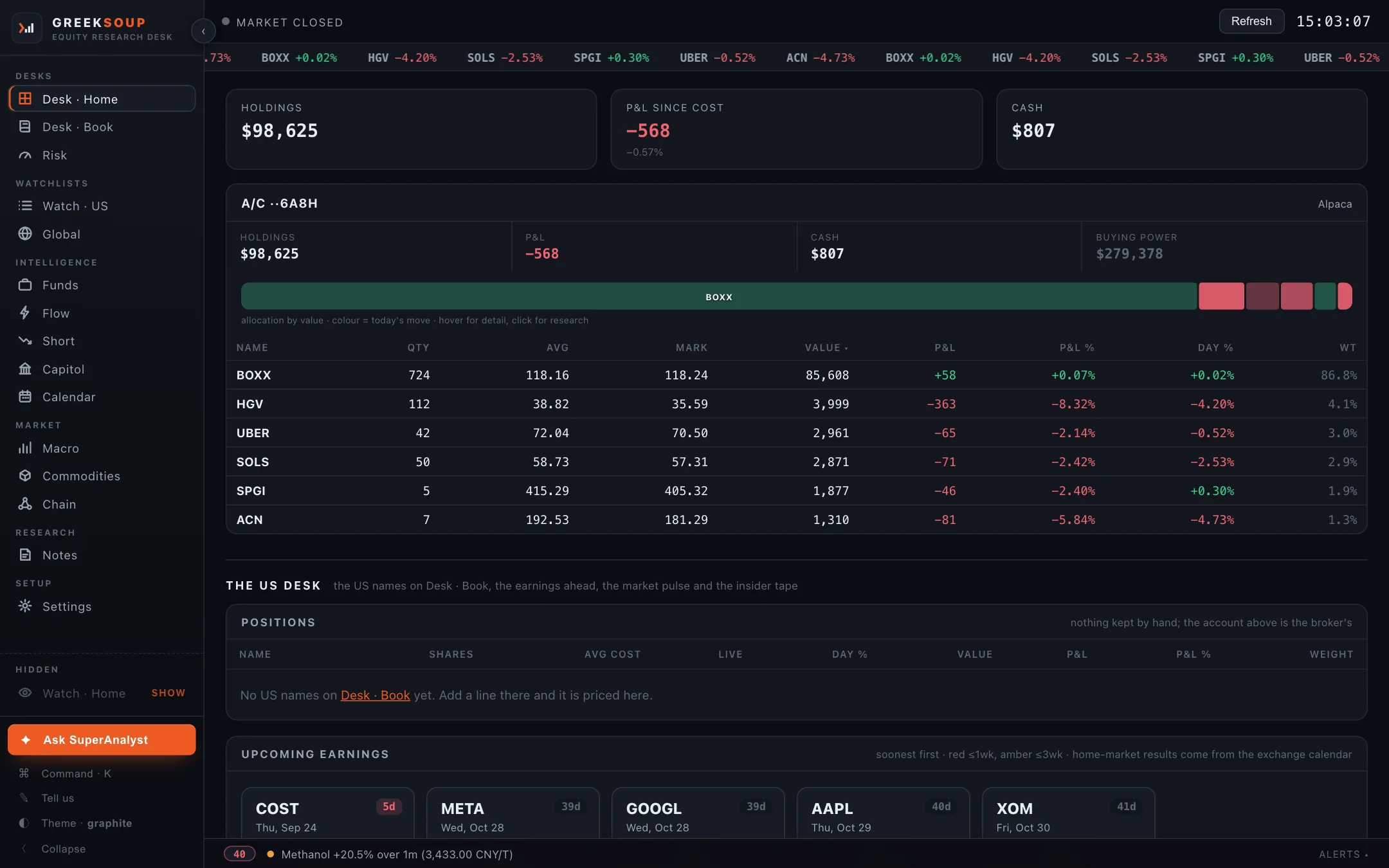
What it shows
The strip at the top is the broker's book in three numbers: holdings at the live mark, profit and loss since cost, and cash. Along the very top, a ticker of the names held with the day's move.
The account block is one broker account. Two brokers in one market sit side by side; a broker in another market gets the desk of that market in its own currency, and the desks are never added across. Inside: holdings, P&L, cash, buying power where the broker reports it, an allocation bar coloured by today's move (hover a segment for the detail, click it to open the name), and the positions table with quantity, average cost, mark, value, P&L, P&L percent, day percent and weight.
Where the broker serves them, the block also carries open futures and options at underlying value, margin used, and an options tape on the index. On a broker that issues a session key each trading day, the block shows the last saved book with live marks until the day's login, and says so.
The US desk sits under the broker block for every reader, because a reader in any market holds and watches US names. Four panels: the US names on Desk · Book priced live, the earnings ahead on the names you hold or watch (soonest first, red within a week, amber within three), a market pulse, and the insider tape from Form 4 filings on your names, with cluster buys marked.
The alerts bar along the bottom carries the desk's own alert lines, commodity moves among them; click it to open the list.
Where each number comes from
| Number | Source |
|---|---|
| Holdings, cash, buying power, margin, open futures and options | Your broker, read-only, through its own API |
| The live mark on each position | The broker's quote where it serves one; otherwise Yahoo's free feed |
| US book positions | Desk · Book, priced from Yahoo's free feed |
| Earnings ahead | Yahoo's free feed; the company's own date once announced, an estimate until then |
| Insider tape and cluster buys | SEC EDGAR Form 4 filings, read by the desk |
| Market pulse (gainers, losers, most active, sectors) | Nasdaq's public screener, no key |
| The market-wide insider scan, the movers with a key | The data provider key |
With and without a key
Without a broker the account block is dark and says so; the US panels still run. Without a feed key the insider tape covers your names only; the key adds the scan across the whole market.
What you can do here
- Click any name to open its ticker page. Hover one for the ⋯ menu: watchlist, note, task, chain, ask your AI.
- Refresh, top right, reads the broker again.
- The index options tape has a Your list button on its panel.
- Ask SuperAnalyst sends this screen's numbers, which here are your holdings, to the AI you chose. Your AI.
Connect a broker on Settings; the six that ship are on Brokers. No broker, or a broker with no API: Desk · Book.